Members Login
Username 
 
Password 
    Remember Me  
Post Info TOPIC: The Dragon And Tiger Joint Hands (1973)


Veteran Member

Status: Offline
Posts: 79
Date:
The Dragon And Tiger Joint Hands (1973)
Permalink  


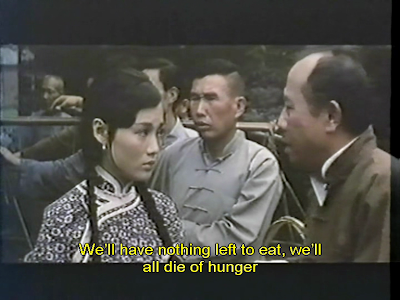
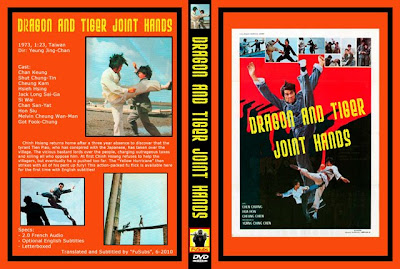
We have a brand new FuSubs release now available. It's the 1973 released The Dragon And Tiger Joint Hands. This is a very cool little kung fu movie starring Jack Long. Tons of fights from start to end. Apart from subtitling this movie into English for the first time, we've also cleaned the video from the original source, corrected the colours and corrected the contrast, vastly improving the picture quality. Take a look at the pics & vid.


MOVIE CLIP

And don't forget to check out our blog:
FuSubs Blog

__________________


EDIT TEAM

Status: Offline
Posts: 1043
Date:
Permalink  
 

Hey really nice job Kaleyboy,

btw, did you also put the movie in 16:9 or it's still for 4:3 screens?
Doing the subs for that must have been a hell of a ride.


:)

-- Edited by Monkeygift on Monday 18th of October 2010 03:58:48 AM

__________________


Administrator

Status: Offline
Posts: 354
Date:
Permalink  
 

The fusubs projects are really cool.
Will buy some in the near future.

Allways nice people make such projects. :)

__________________

south.gif

bannerforum.jpg
 
shi.jpg


Veteran Member

Status: Offline
Posts: 79
Date:
Permalink  
 

Thanks guys! I tested it in 16:9 and it looked very squashed, like the actors were midgets. So I just did some corrections, but kept it in it's 4:3 ratio, as it looked far better. However, it's encoded to work perfectly on 16:9, 4:3 & pan and scan screens. It automatically adjusts according to the DVD player setting.


-- Edited by kaleyboy on Monday 18th of October 2010 07:08:19 PM

__________________


EDIT TEAM

Status: Offline
Posts: 1043
Date:
Permalink  
 

Ok! but the "midget" thing you can correct that by using CovenvertXtoDVD when making your final .ISO file to burn to DVD. That program while properly convert your movie for 16:9 screens.


__________________


Veteran Member

Status: Offline
Posts: 79
Date:
Permalink  
 

I tried convertXtoDVD. It caused extra black bars at the top and bottom of the screen on a 16:9 TV. Like it was double-letterboxed. I've used the program to correct AR on other releases, but it just didn't work well with this.

__________________


EDIT TEAM

Status: Offline
Posts: 1043
Date:
Permalink  
 

Did you try to fix it manually in ConvertX?

If you have extra black bars it should be only if your film is like 2:35 or wider than the actual screen (tv or computer monitor).

If you have a small part of your film online or that you can upload (just a sample like 1 minute) I can try to fix this and let you know how I did it.  smile

Also, there's a way to cover your widescreen bars there which are rather gray-ish. You can have them deep black without alterning your movie colors or brightness.


__________________


Veteran Member

Status: Offline
Posts: 79
Date:
Permalink  
 

Yes, I tried to do it manually in convertXtoDVD, and it looked fine on the program and in media players on the PC. But when I burned it and played it back on my 16:9 WS TV (40 inch), I got like two sets of bars. The standard ones that are meant to be there, and an extra smaller set. It didn't look good. So I changed it back and it looked fine. It looks absolutely great on a widescreen TV, otherwise I wouldn't put it out. I only have widescreen TV's at home, no fullscreen ones. The version released is AR adjusted, I have changed it using convertXtoDVD, but I've kept the 4:3 flag in the IFO, otherwise it looked weird.


-- Edited by kaleyboy on Tuesday 19th of October 2010 03:03:16 PM

__________________


Veteran Member

Status: Offline
Posts: 79
Date:
Permalink  
 

Here are some comparison shots between the old print, and our new worked on print. As you can see, I've clearly made it for 16:9 screens.

OLD


NEW


OLD


NEW


__________________


EDIT TEAM

Status: Offline
Posts: 1043
Date:
Permalink  
 

Which remastering programs are you using?
I usually work with VirtualDub.
They have one cool application were you can add black bars on top of those existing
black bars you have there, in order to make them pure deep black instead of gray
so that you don't notice as much that it comes from a VHS.

Here's an example from a movie I remastered called "The Hungry Snake Woman". I took the Japanese VHS and put it in widescreen 16:9 and I masked the already existing black bars with deep black "black bars" so that it looks more clean.


-- Edited by Monkeygift on Friday 22nd of October 2010 03:16:36 AM

__________________


Veteran Member

Status: Offline
Posts: 79
Date:
Permalink  
 

I don't like virtualdub as it always struggles with mpeg-2. I use a ton of programs, many different for each film. Some films need one approach, some another. Vreveal is good for video cleaning.

__________________


EDIT TEAM

Status: Offline
Posts: 1043
Date:
Permalink  
 

Yes you are right, some videos I tried different approaches too. However, Virualdub covers much of my work, but it does need the help of 3 other programs at least to finish the job.
Now I have a whole buch of filters tso I'm pretty good with the program but it took me over a year to know exactly what to do in different situations (washed out film, Black and white, etc). I'm still learning some new things from time to time.

Do you do your own subs by the way? If yes, that means you do speak speak French right? (just like me ;) )

cheers!

__________________


Veteran Member

Status: Offline
Posts: 79
Date:
Permalink  
 

My friend and fellow FuSubs member Roger Judd does all our french translations. I do the timing, though.

__________________


Veteran Member

Status: Offline
Posts: 79
Date:
Permalink  
 

What filters do you find work best in virtualdub? I have a couple of FLV files I'd like to clean up, thought maybe I'd give virtualdub a try as an experiment.

__________________


EDIT TEAM

Status: Offline
Posts: 1043
Date:
Permalink  
 

I use a bunch of them, sometimes up to 8 or 9 at once which makes my rendering really long (9 to 12 hours). But I would say that for me one of the most useful one is "NEAT VIDEO", it is not a free pluggin like the other ones but I'm sure you can find it somewhere on a torrent site, otherwise it cost about 50$ I think.

__________________


Veteran Member

Status: Offline
Posts: 79
Date:
Permalink  
 

Thanks for the info, I'll give it a whirl.

__________________
Page 1 of 1  sorted by
 
Quick Reply

Please log in to post quick replies.


Create your own FREE Forum
Report Abuse
Powered by ActiveBoard